
Please read carefully the payment instruction to pay from any Crypto Wallet, moonpay, Revolut, Coinbase, binance , Trust Wallet etc
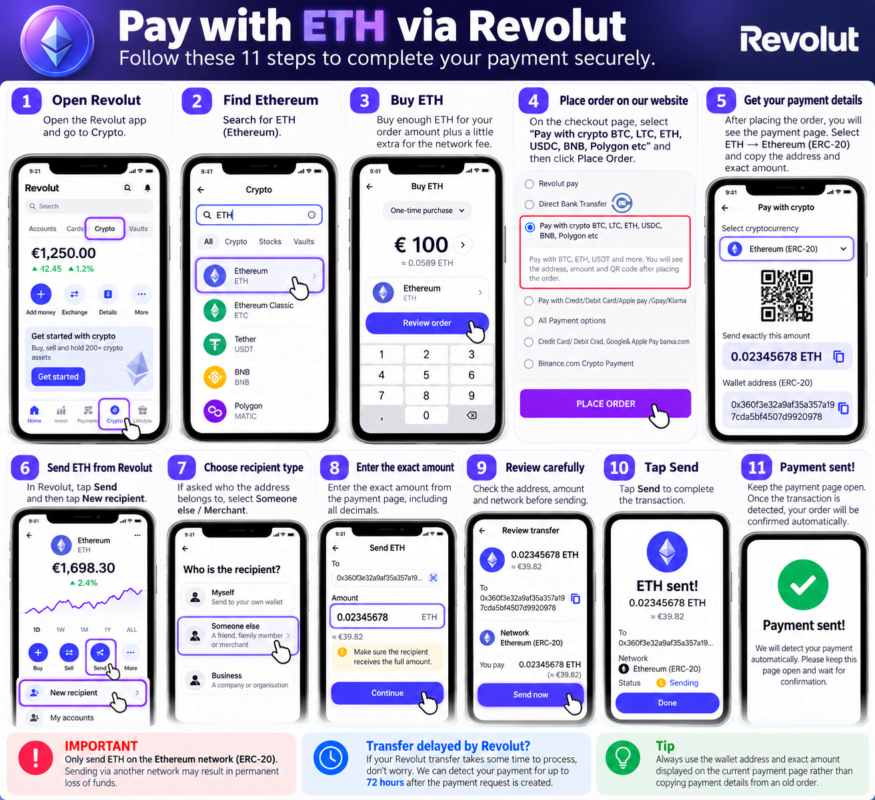
💰 Pay with ETH via Revolut 1️⃣
Open the Revolut App
2️⃣ Go to Crypto → search ETH (Ethereum)
3️⃣ Buy ETH for your order amount, plus a little extra for the network fee
4️⃣ On our payment page choose ETH → Ethereum (ERC20) and copy the address and the exact amount
5️⃣ In Revolut tap Send → New → paste our ETH address
🌐 Network: Ethereum only
6️⃣ If Revolut asks who the address belongs to, choose the option for someone else / a merchant (the wording depends on your app version)
7️⃣ Enter the exact amount from the payment page, with all decimals ‼️
8️⃣ On the review screen, check that the recipient receives exactly that amount. If the fee is subtracted, increase what you send
9️⃣ Double-check the address and network 🔍
🔟 Tap Send ✅🎉 Done! Keep the payment page open and your order will be confirmed automatically
⚠️ Only send on the Ethereum network. Other networks = lost funds
⏰ Transfer delayed by Revolut? No problem, we detect your payment for up to 72 hours
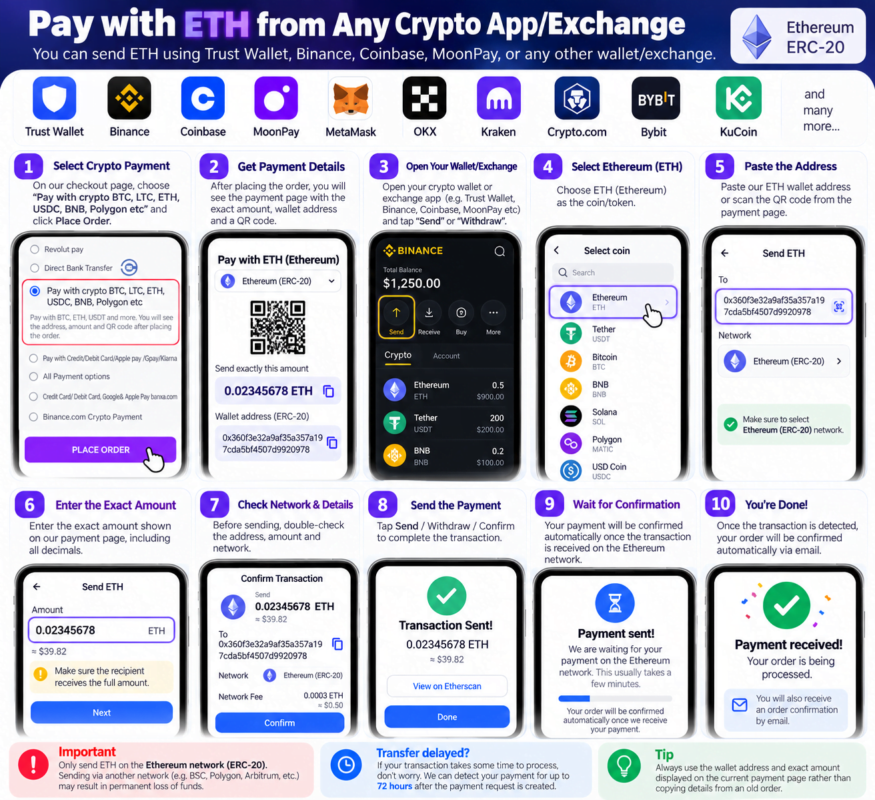
💰 Pay with Crypto from Any Wallet or Exchange
Pay with ETH, BTC, LTC, BNB, USDC, USDT, POL and more, from almost any wallet or exchange:
Binance • Coinbase • Trust Wallet • MetaMask • OKX • Kraken • Crypto.com • Bybit
⭐ Recommended: ETH. It’s simple, and the network fee is paid in ETH itself, so you don’t need an extra coin for fees.
━━━━━━━━━━━━━━━
1️⃣ Place your order
At checkout choose “Pay with crypto” and tap PLACE ORDER.
2️⃣ Choose your coin
On the payment page, pick your coin and network.
You’ll see the address, the exact amount, the network and a QR code.
3️⃣ Open your wallet or exchange
Go to Send or Withdraw.
4️⃣ Select the same coin
Payment page shows ETH ➡️ select ETH
Payment page shows BTC ➡️ select BTC
5️⃣ Select the same network 🌐 ‼️
The network in your wallet must match the payment page:
- ETH ➡️ Ethereum
- USDC / USDT / BNB ➡️ the network shown on the page
- POL ➡️ Polygon
6️⃣ Paste our address
Copy it from the payment page, or scan the QR code.
Check the first and last 4 characters.
7️⃣ Enter the exact amount
Example: 0.02345678 ETH
💡 If your exchange subtracts its fee, add the fee on top so the exact amount arrives.
8️⃣ Check before sending 🔍
☑️ Coin
☑️ Network
☑️ Address
☑️ Exact amount
9️⃣ Send ✅
Tap Send / Withdraw / Confirm and keep the payment page open.
🔟 Automatic confirmation 🎉
We detect your payment automatically. Your order is then confirmed and you get an email.
━━━━━━━━━━━━━━━
⏰ Delayed transfer? No problem.
We keep watching for your exact payment for up to 72 hours after the payment timer ends.
⛽ Network fees
- ETH, BTC, LTC, BNB, POL: the fee is paid in the same coin
- USDT / USDC: the fee is paid in the network’s coin (ETH, BNB or POL). Most exchanges handle this for you.
⚠️ Most important rule
Always use the exact coin + network + amount shown on your payment page.
Never pick another network because it’s cheaper. Wrong network = funds lost forever.